SettingsRoles & Permissions
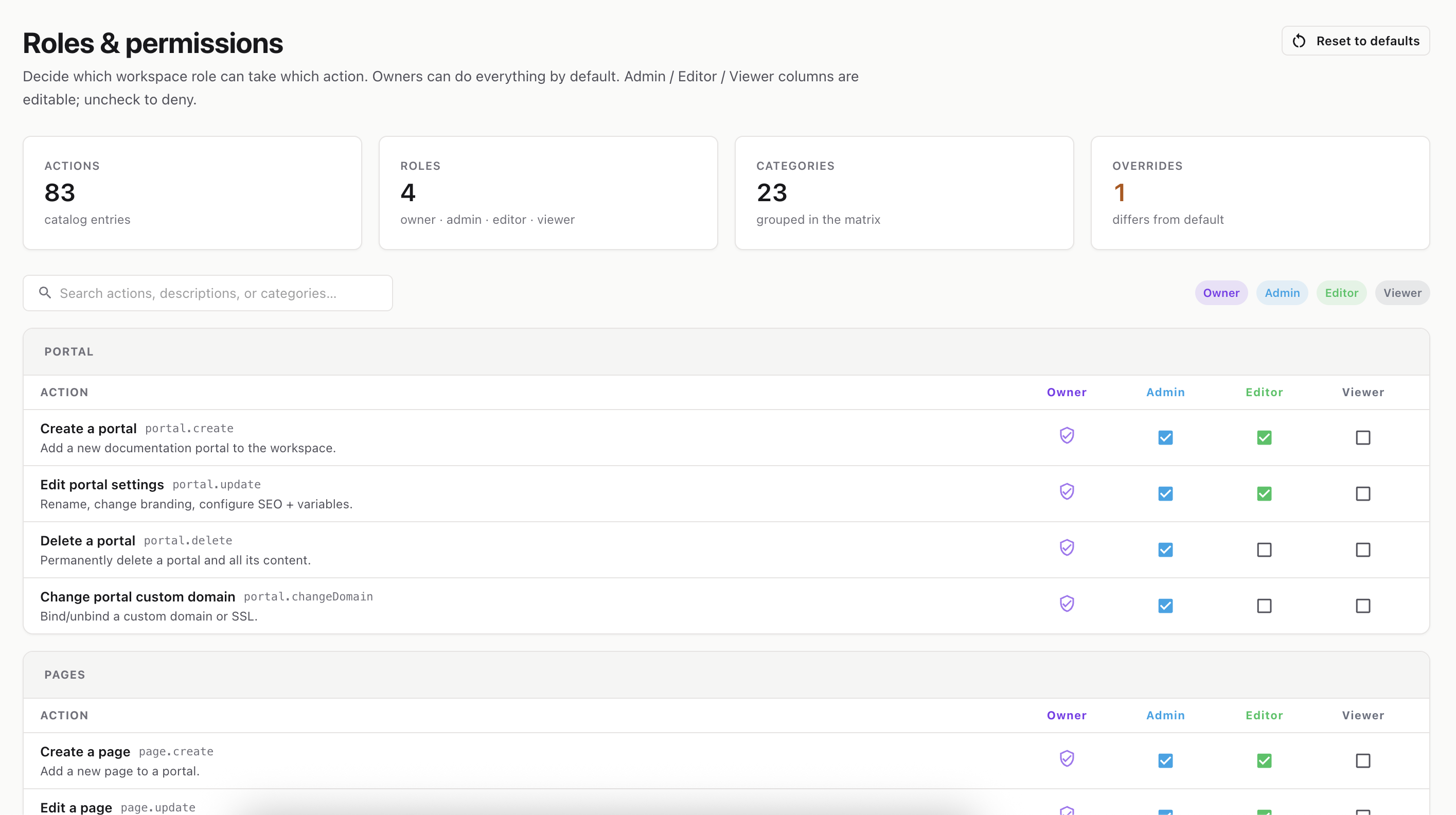
Decide exactly which role can perform which action in this workspace. A simple checkbox matrix that overrides the platform defaults — for this workspace only.
Route: /settings/roles
The Roles & permissions page is a grid. Down the left are every action a user can take (grouped by category like Members, Roles, Portals). Across the top are your roles — Owner, Admin, Editor, Viewer. Each cell is a checkbox that says “can this role do this action?”
The stats strip shows how many actions and roles exist, and how many permissions you’ve customized (overrides).
💡 Hover any checkbox to see its tooltip — it tells you whether the value is the platform Default or an Overridden setting.
Click Reset to defaults to clear all of this workspace’s overrides at once and return every action to the platform baseline. This asks for confirmation and can’t be undone. (The button is disabled if you have no overrides.)
Use the search box to filter by action name, description, category, or its technical key. Categories with no matches are hidden as you type.
ℹ️ Notes for non-technical users:- Some actions are platform-managed (locked) and can’t be changed here — their checkboxes are disabled.- The Save / Discard / Reset buttons only appear if you have permission to edit roles. Otherwise the matrix is read-only.